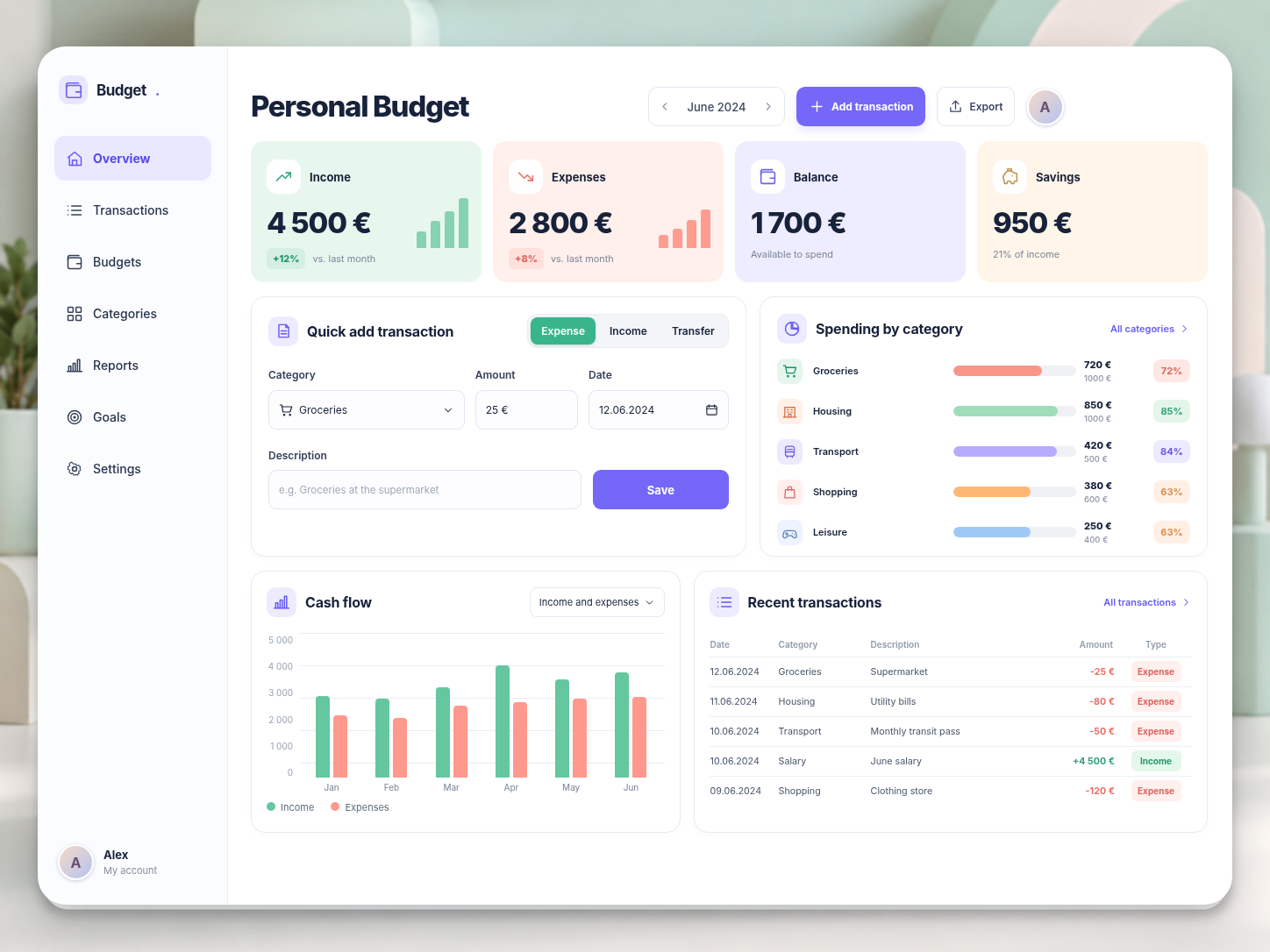
What you will be able to do in your app
Imagine a convenient dashboard where you can see your income, expenses, and available budget at a glance.
Track your finances
Record income and expenses and organize them by category.
Plan your budget
Set monthly budgets and spending limits.
Control spending
See how much you have spent and how much you have left.
Analyze your finances
Explore your spending through charts and graphs.
Transaction history
Browse, find, and edit your transactions.
Personal account
Sign in to your personal account where your data is stored.
The app will run in a browser on your computer or phone. You will not need to connect bank accounts: you can enter every transaction manually.
How does the course work?
You will progress step by step, adding new features to your app along the way.
7 practical missions
From your first screen to a finished application.
Step-by-step instructions
Visual examples, ready-to-use Lovable prompts, and help when you get stuck.
Progress with every mission
Each mission gives you a tangible result, plus stars and achievements for completing tasks.
What you need
A Lovable account and a Pro subscription (from $25/month), purchased separately. No programming skills needed.
Duration: approximately 6–9 hours of hands-on work.
Your result
By the end of the course, you will have not just a demo mockup but your own working web app that you can use, modify, and develop further.
And you will know how to create your next one.
7 missions. One real app. New possibilities for your ideas.
Course program: 7 practical missions
- 01
Plan your personal budget
Turn your app idea into a clear plan. Define the main features, outline the pages, and prepare your first Lovable project.
- 02
Create the interface
Build the dashboard, forms, buttons, and navigation. Make the interface easy to use on a computer and phone.
- 03
Create an account and data storage
Connect a database and set up registration and sign-in. Teach your app to store information and protect access to it.
- 04
Track income and expenses
Create forms for adding income and expenses, transaction categories, and tools to edit and delete entries.
- 05
Plan your spending
Add a monthly budget, category limits, and clear indicators showing how you are doing against your plan.
- 06
Analyze your finances
Create charts, automatic calculations, transaction history, filters, and comparisons of planned and actual spending.
- 07
Test and publish your app
Test key features, fix issues, and publish your completed web application.
Bonus: make your budget smarter with AI
Want to take it further? Find out how to add artificial intelligence features to your app.
In an optional extra lesson, you will explore features that can suggest expense categories, analyze spending patterns, summarize the month, and answer questions about your budget.
This bonus is optional. Your app will work fully without AI. Using AI features may require additional resources and costs.